A free skill that designs your application using the 7 building blocks framework: one paragraph in, a labeled architecture and a buildable design doc out.
You give it one paragraph about what your app does. It walks you through a few questions about users, external services, and your features, then hands back which blocks you need, why, and a recommended technology for each. Works on claude.ai and in Claude Code.
One or two sentences. What does it do? Who uses it?
Users (humans, AI agents, both?) and external forces (third-party APIs, scheduled work).
Plain English. The skill decomposes each feature into the blocks it needs.
A markdown design doc, an architecture diagram, and per-block technology recommendations.
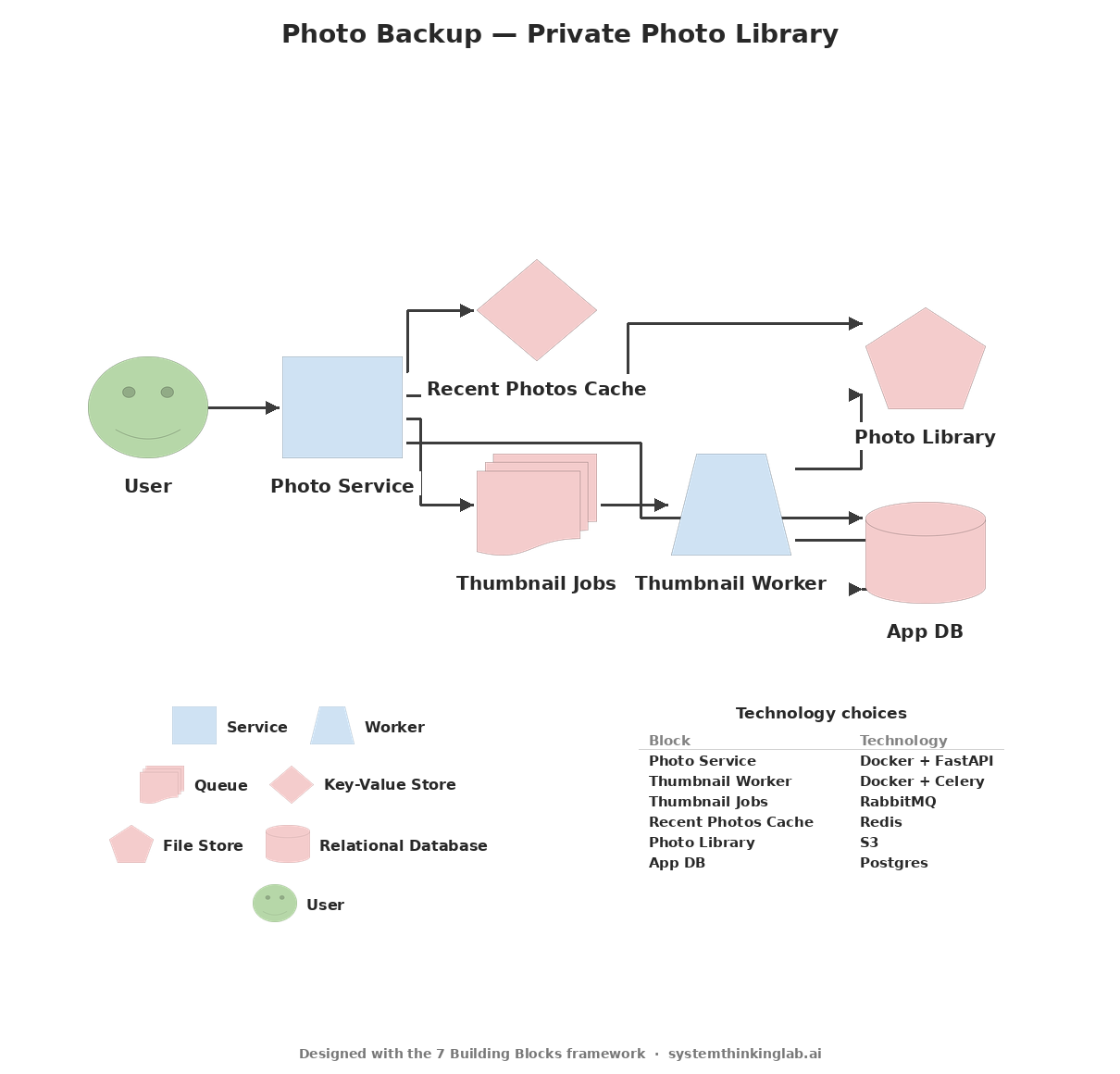
A real example, generated from the paragraph below. The diagram shows the shape; the doc tells your coding tool exactly what to build.
The input
"Photo Backup. A private app that auto-uploads photos from your phone and generates thumbnails for fast browsing. Users sign in, photos sync in the background to a personal library, and a thumbnail grid loads instantly even on a slow connection. No social features, no comments, no algorithm. Just the photos."
Output 1 of 2 — the architecture diagram
Output 2 of 2 — the markdown design doc
Free and open source (Apache-2.0). Pick the surface you already use.
Listed in Claude Code's plugin directory (reviewed by Anthropic, October 2026).
Then run /design-with-blocks in any session. Updates: /plugin marketplace update systemthinkinglab.
Installs into your project's .agents/skills/design-with-blocks/ as an Agent Skill. The skill is built and tested in Claude Code.
Settings → Capabilities → Skills → Add Skill. Download the repo, then upload the design-with-blocks/skills/design-with-blocks folder.
Course 0 teaches the workflow for directing AI on real work; Courses I-IV teach the thinking behind this skill, so the next design is yours.
The codebase you just inherited becomes legible. The system design interview becomes a structured conversation. The AI-generated architecture lands on your desk, and you can tell whether it is right. That fluency is what Courses I-IV build: hands-on discovery labs, real design challenges, and case studies of Instagram, Netflix, and Uber.
Free five-day course